
Start with one language, then use small projects to turn its rules into working code. Project based programming courses offer a practical way in: choose a beginner-friendly project, learn the concepts it needs, and apply them as you build rather than trying to absorb everything at once.
It’s understandable to feel unsure where to begin when each language leads in a different direction. Start with the outcome you want to create, then build skills such as variables, conditions, functions, data handling, and debugging through practical tasks that grow in complexity.
This guide explains how to choose a starting point, which programming skills projects can teach, and how to organise lessons by language, from Python and web development to GIS applications. You’ll also learn how to use each finished project to show what you can build, creating a clear path from your first lines of code to more capable applications.
Key Takeaways
- Choose a project that matches what you want to build, then practise core skills such as functions, data handling and debugging as you develop it.
- Move beyond beginner exercises by adding features, organising code and testing how your application behaves.
- Follow a curriculum that builds from fundamentals to a complete project, with each lesson applying a specific concept.
- Pick tutorials by language and goal, whether you want to build web applications, work with Python or create GIS projects.
Programming and developer skills taught
Build practical coding skills by connecting each concept to a working feature. In Python, for example, practise variables, conditions, loops, and functions by processing a list of expenses. Then add file handling to save the results and use debugging to find errors. These tasks teach you to break a problem into smaller instructions, test each part, and improve the code when it behaves unexpectedly.
What projects do students build in popular programming courses? Common examples include web applications, mobile app prototypes, data tools, and simple games. A web project might let users register, browse products, and submit an order; a mobile project could track daily habits. A game can teach event handling, scoring, and collision rules, while a Python data project can sort and summarise information.
Web development projects bring several skills together. Use HTML to structure a page, CSS to style it, and JavaScript to respond to actions such as button clicks. Add a form, validate its fields, and display a clear result. For server-side work, a framework such as ASP.NET MVC can introduce routes, controllers, and views through an e-commerce example. Each feature gives you a practical reason to explore how data moves through an application.
- Plan: Write down the user’s goal and the main features.
- Build: Create one feature, such as a product list or score counter.
- Test: Try expected inputs and edge cases, then fix errors.
- Improve: Organise the code and explain what each part does.
What entry requirements and equipment do UK programming courses require? Requirements vary by course, but beginners can start without previous coding experience. For online lessons, you need a computer, internet access, a web browser, and a code editor; the language and project determine whether you need extra software. Project based programming courses are most useful when you practise each skill by changing and testing the project, rather than just reading the code.
Programming Projects for Advanced Beginners
Move beyond guided examples by building features that work together. A JavaScript task tracker, for instance, can let users add tasks, mark them complete, and filter the list. Store entries in the browser, then refresh the page to test whether they remain available. This project brings event handling, data structures, and interface updates into one practical workflow.
Which project-based coding courses suit complete beginners? Choose a course that explains each step and builds towards a small finished application, such as a personal portfolio or basic task manager. You can extend the project later with features such as search, input checks, or saved data.
For a greater challenge, turn a simple application into a system with different user actions. A booking project could collect a date, check required fields, and display a confirmation. Separate these tasks into functions, then test both valid and incomplete entries. This gives you practice tracing how information moves from a form to the result on screen.
- Plan: Sketch the screens and list the user actions, such as adding or editing a record.
- Build: Create one feature at a time, keeping interface code separate from data rules.
- Test: Try empty fields, repeated entries and unexpected input.
- Refine: Rename unclear variables and remove duplicated logic.
Projects can also connect code with real-world information. A mapping tool built with JavaScript and the ArcGIS Maps SDK can display locations and respond to map interactions. Start with a clear goal, such as marking local services, then add controls that help users explore the map. This suits learners ready to connect interface behaviour with geographic data.
Choose an applied next step with the ArcGIS Maps SDK for JavaScript tutorial series in Arabic. It gives you a language-specific route into mapping projects, with a concrete focus on interactive geographic applications.
Project-based programming curriculum
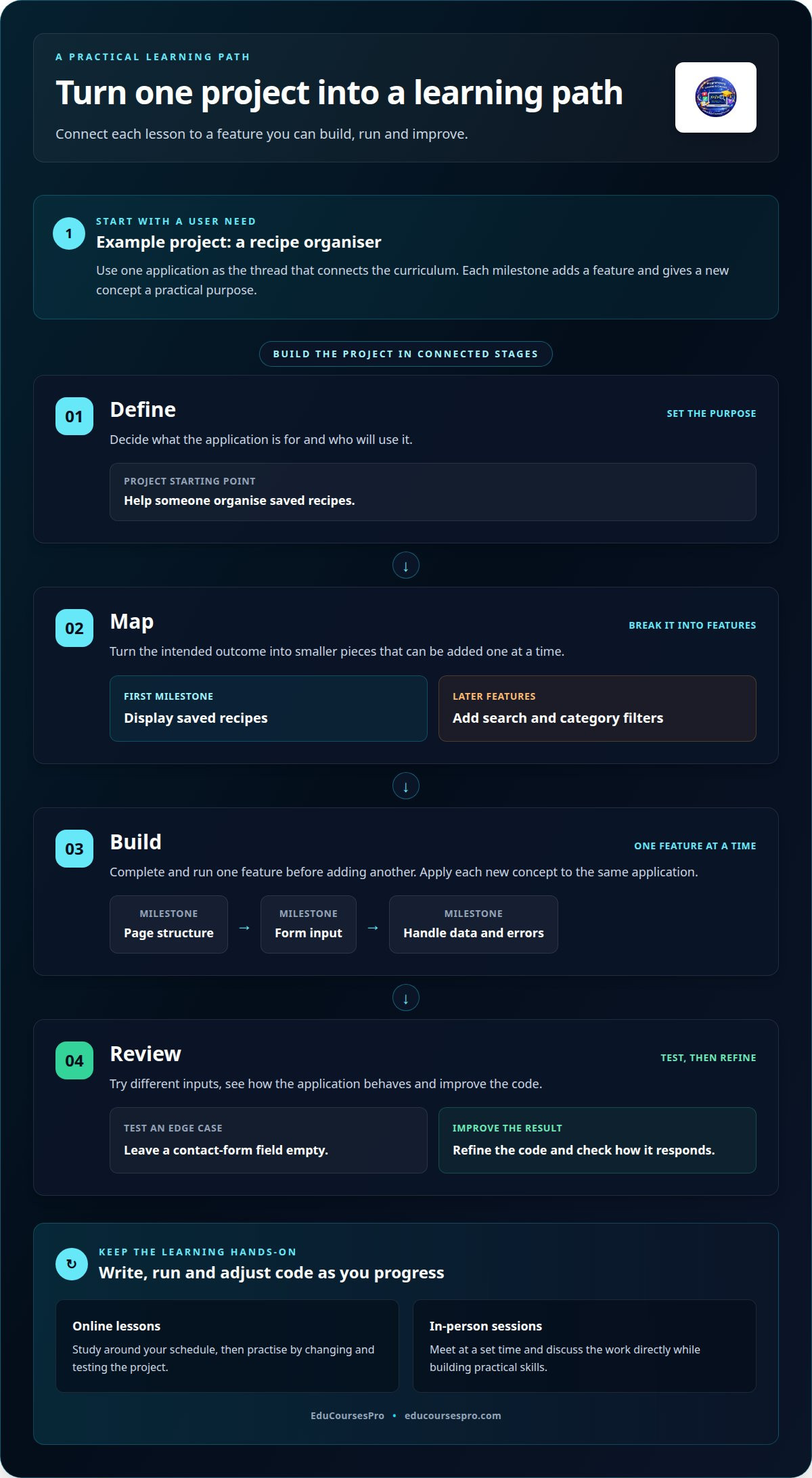
Project based programming courses work best when each lesson adds a clear stage to one application. Choose a technology, such as JavaScript, and define a user need. For a recipe organiser, the first milestone might display saved recipes; a later lesson can add search and category filters. This structure links each new concept to visible progress and gives every task a practical purpose.
Online lessons let you study around your schedule, while in-person sessions have a set time and allow direct discussion. Either format can support hands-on learning when you write, run, and adjust code as you progress. For example, build a contact form, then test how it responds when someone leaves a field empty.
Plan the curriculum as a sequence of connected milestones. A web application might start with page structure, move to form input, then handle data and errors. At each stage, apply one concept to the same project. A registration feature, for instance, can develop from collecting details to checking entries and displaying a result.
- Define: Set the application’s purpose and intended user.
- Map: Break the outcome into features, such as search or saved records.
- Build: Complete and run one feature before adding another.
- Review: Test different inputs and refine the code.
The best project based programming courses match your goal with a clear syllabus and a finished project. If you want to develop web skills, choose a learning path that includes building and testing an application, rather than one that only explains concepts.
Completion time depends on the scope of the lessons, project complexity, and the time you set aside to practise. A milestone-based plan helps you track progress through each feature and fit learning around your schedule. Set a regular study slot, then adjust it as you discover which tasks need more practice.
Project-based programming tutorials organised by language
Choose tutorials based on the language you want to use, then follow one project from setup to finished feature. This keeps examples consistent and helps you see how each language handles the same programming problem. Python suits exercises involving data and automation; JavaScript focuses on interactive web pages; ASP.NET MVC organises web applications around models, views, and controllers.
For Python, a data-cleaning project can process a file of records, handle missing entries, and produce a clear summary. Work through the steps in order: read the input, transform values, check the output, then improve the code. Each stage gives you a reason to practise variables, functions, collections, and error handling.
With JavaScript, build an interface that responds to user actions. A filterable list, for example, can take a search term and update the displayed items. Choose a tutorial that explains events, arrays, and rendering in context. For mapping, the ArcGIS Maps SDK for JavaScript offers a more specialised path, connecting code with interactive geographic information.
How can learners compare course quality, tutor support, and job outcomes? Compare the syllabus, project requirements, feedback arrangements, and examples of completed work. Assess job outcome claims separately: look for clear evidence and course-specific details, rather than assuming a course alone guarantees employment.
- Language fit: Check that the project uses the language tied to your goal, such as Python for data tasks.
- Project depth: Look for a complete result, not disconnected code snippets.
- Support: Identify how questions and feedback are handled during the lessons.
- Evidence: Review what you will build and how you can explain your contribution.
Keep the project’s purpose fixed as you compare languages. Rebuilding a simple contact list in Python and JavaScript, for instance, reveals differences in syntax and application context. Choose one route first, complete its project, and then decide which technology to learn next.
Rust can be a useful alternative project route for learners comparing languages: Rust has ranked as the most loved programming language in Stack Overflow's annual developer survey for 8 years. In 2020, the author read The Rust Programming Language and completed small code examples. That sequence offers a modest starting point: work through focused examples, then decide whether Rust fits your goals before committing to a larger project.
EduCoursesPro
EduCoursesPro helps you turn programming concepts into practical work through structured, project-focused courses. If you want to apply web development skills, its ASP.NET MVC lessons use an e-commerce website management system as the practical application. Other learning paths cover Python and artificial intelligence, Angular for a clinic management system, and ArcGIS Maps SDK for JavaScript tutorials in Arabic.
Choose a course based on the kind of application you want to understand and build. A defined project lets you practise concepts in context, follow lessons towards a working result, and develop your skills step by step. It’s a useful next move if you’re ready to progress from general coding practice to a guided technology project.
Contact EduCoursesPro to discuss which course fits your learning goals.
Choose a project and take your next step
Your next move is to choose a project you can keep improving. Set a clear goal, build a first version, then add features as your skills grow. That turns project based programming courses into steady practice rather than a one-off exercise. Keep your code and notes together so you can explain the decisions behind your work.
EduCoursesPro’s practical learning paths include ASP.NET MVC lessons built around an e-commerce management system, an ArcGIS Maps SDK for JavaScript tutorial series in Arabic, and Python and artificial intelligence lessons focused on applications and intelligent projects. Specialist instructors with practical experience guide the courses, helping you connect concepts to applied work. Choose the direction that fits your interests, then work through it one step at a time.
Ready to choose a learning path? Contact EduCoursesPro about course options and take a practical next step towards building with confidence.
Frequently Asked Questions
How do I get started?
Choose an outcome you care about, such as a reading log that records books and lets you mark them as finished. Write down the smallest useful version before choosing tools. Set up the editor, create a basic screen, and make one action work. Save each working change separately so you can return to it if a later edit causes problems.
What skills will I learn?
You’ll practise turning a broad idea into clear requirements, choosing what to build first, and checking whether each feature behaves as expected. A reading log, for example, needs a way to add a title, update its status, and handle an empty entry. You’ll also learn to read error messages, isolate the cause of a bug, and explain how your code solves the task.
Which programming languages and skills do project-based coding courses teach?
The right languages depend on your intended outcome. Python can help you practise data processing and application logic; JavaScript supports browser-based interactions; ASP.NET MVC teaches a structured approach to web applications. A course can also help you practise organising code, handling user input, and testing features. Choose a language based on the kind of work you want to try, not popularity alone.

