
Start with a solid foundation: an ASP.NET MVC course is easier to follow when you can read C# and use the .NET tools required by the course materials.
If routing, controllers and action methods seem like separate pieces, connect them by tracing how a request moves through an application and produces the result a user sees.
This guide covers development prerequisites, request flow and course fit, then explains how practical e-commerce project work can help you apply core MVC concepts.
Key Takeaways
- Trace how routing directs a request to a controller and action method, then connects the result to a view.
- Match your development tools to the .NET version you plan to use, and build on a working knowledge of C#.
- Understand what can affect course costs and completion time so you can choose a learning plan that fits your goals.
- See how a practical e-commerce project can help you apply MVC concepts in a structured learning path.
Routing, controllers and action methods
In an ASP.NET Core MVC project, a request passes through routing and a controller action before producing a response. Follow that sequence to see how an e-commerce page turns a URL or submitted form into useful output.
Routing Configuration
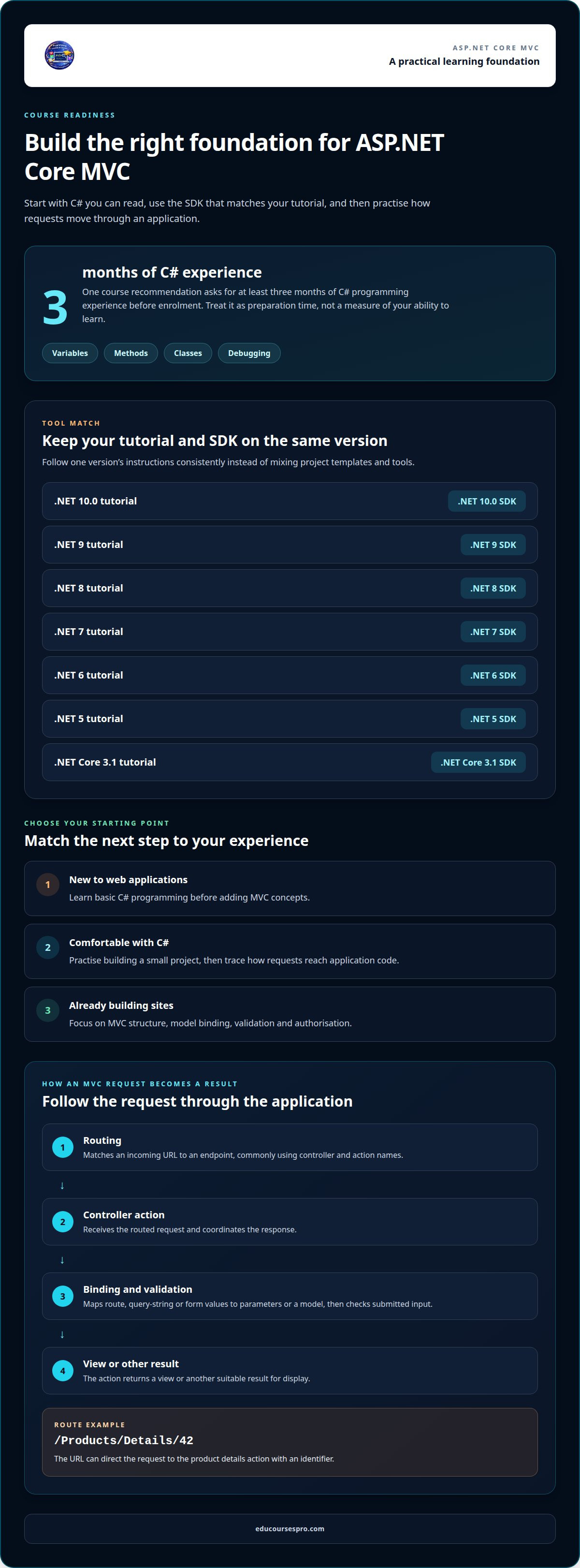
Routing matches an incoming URL to an endpoint, commonly using controller and action names. A conventional route pattern can set Home as the default controller and Index as its default action, while an optional id segment supports record-specific pages. For example, /Products/Details/42 can direct the request to the product details action with an identifier.
In the configuration, examine the route pattern, its defaults and any optional parameters. Then trace a sample URL through each segment. Clear routes make product pages and management screens easier to understand, while inconsistent patterns can send similar requests to unexpected actions. Attribute routes offer another option: an action can declare its route close to its code.
Controller Responsibilities
A controller receives the routed request and coordinates the response. In a shop management example, ProductsController might handle a product list, a detail view and an editing workflow. Keep each action focused: retrieve or prepare the data, then return a view or another suitable result for display.
Separate responsibilities deliberately. A controller should not hold every rule in the application. When handling an edit request, it can pass submitted data through validation and decide whether to redisplay the form or return an updated result. This separation makes it easier to trace what happens without mixing request handling, business decisions and page presentation.
Action Methods, Data Binding and User Input
An action method handles a specific operation. A Details action can receive a product identifier from the route, while an Edit action can receive fields from a submitted form. Data binding maps route values, query-string values or form fields to action parameters or a model.
For example, an edit form might submit a product name and description. Validate the input before processing it. If validation fails, return the form with the entered values and validation messages. In an ASP.NET MVC course, trace the request from route matching through binding and validation to the final display. This practical sequence makes each part of an MVC project easier to understand.
Course prerequisites and intended learners
You can start learning ASP.NET Core MVC with a sound grounding in C# and the right .NET development tools. One course recommendation calls for at least three months of C# programming experience before enrolment. Treat that as preparation time to practise variables, methods, classes and debugging, not as a measure of your ability to learn.
Match your software development kit (SDK) to the tutorial version. The getting-started tutorial for .NET 10.0 names the .NET 10.0 SDK as a prerequisite. Tutorials for .NET 9, .NET 8, .NET 7, .NET 6 and .NET 5 each name their corresponding SDK. A .NET Core 3.1 tutorial requires its matching SDK. Follow one version’s instructions consistently instead of mixing project templates and tools.
- New to web applications: Learn basic C# programming before adding MVC concepts.
- Comfortable with C#: Practise building a small project, then trace how requests reach application code.
- Already building sites: Focus on MVC structure, model binding, validation and authorisation.
These steps help you decide whether to begin with programming fundamentals or move directly to web application structure. If classes, methods or objects are still unfamiliar, practise those C# concepts first. If you can read them comfortably, focus on how an MVC application organises requests, data and responses.
Approach authorisation with care. It controls access to protected application features, such as an administration area, and builds on an understanding of users and application flow. Practise the underlying MVC structure before adding access rules. That foundation helps you understand where the rules belong and how they affect a request.
Use a simple readiness check: confirm your C# foundation, install the SDK that matches your tutorial, and build a small web application. This gives beginners a manageable starting point and experienced programmers a focused route into ASP.NET Core MVC.
How do course fees work in the UK?
Judge a course by the learning experience, not just its list of topics. Check whether lessons take you from a working starting point to a finished application, with explanations that connect each stage. In an e-commerce project, for example, follow how product information moves from an input form to a page a user can view.
Use these checks to assess the course structure:
- Lesson sequence: Look for a clear progression from setting up the project to completing connected features.
- Code practice: See whether you write and adapt code, rather than only read demonstrations.
- Debugging work: Check for opportunities to interpret errors and correct application behaviour.
- Project completion: Find out whether the learning path ends with a working result you can explain.
Pay attention to how lessons handle changes. After creating a product form, for example, a useful exercise might ask you to add another field and update the display. This tests whether you understand how the files relate, rather than whether you can reproduce one example exactly.
Consider how you prefer to learn, too. Some learners benefit from short, focused lessons followed by independent coding. Others need a guided sequence that connects each new task to the previous one. Choose materials that provide enough context to tackle the next step while still asking you to make decisions and test your code.
Before committing to a learning path, identify what you want to build and which skills you need to practise. Then check whether the course structure supports both. A well-matched programme takes you from individual concepts to an application you can run, inspect and explain. That makes it easier to judge whether the learning experience suits your goals.
How long does course completion take?
One listed ASP.NET MVC 5 and MVC Core 9.0 course gives a duration of 60 days. Treat that as the schedule for that programme, not a fixed completion time for every learner. Your pace depends on your C# experience, available study time and how much practice you give each project task.
Distinguish completing lessons from understanding the practical work. You might follow a lesson about controllers quickly, then need more time to apply the idea to an e-commerce feature. Building a product list, editing product details and tracing a submitted form each involve different steps. Make time to code, test and correct each feature, rather than simply moving through the lessons.
Break the work into a sequence you can track:
- Learn a concept: Follow a lesson on routing or action methods.
- Apply it: Add a matching feature to your MVC project.
- Test the flow: Send a request and inspect the result.
- Review errors: Correct the code, then repeat the task independently.
This approach makes progress visible without assuming everyone follows the same schedule. Someone who already understands C# may move through familiar programming concepts faster, while a beginner may need extra practice with project structure before building the same feature. The project scope matters, too: a product display page is narrower than a complete management workflow.
Choose a repeatable study routine that fits your commitments, and set aside time for hands-on work between lessons. If you take a break, return to the last working feature and continue from there. Track completed tasks, such as routing a product request or validating an edit form. These milestones show whether you can apply the concepts, not just recognise them.
Use the 60-day listing as a reference point when planning, then judge your progress by completed, tested features. An ASP.NET MVC course suits your schedule best when its lesson sequence and project workload match the time you can consistently set aside.
EduCoursesPro
EduCoursesPro turns programming concepts into practical project work through online technology courses and lessons. If you’re ready to connect ASP.NET Core MVC architecture with an application, its ASP.NET MVC lessons use an e-commerce website management system as the practical project. Work through the structure and apply concepts to a recognisable type of web application, rather than treating each topic as an isolated idea.
Courses are project-based and guided by specialist instructors with practical experience. Choose a learning path that matches your current goal, whether you’re building programming foundations or developing skills for a specific technology project. Courses also provide certificates of completion. Explore the options and choose a project direction that fits your next step. If you’d like help deciding where to begin, contact EduCoursesPro.
Turn the architecture into your next project
Understanding request flow gives you a starting point for building web applications with purpose. Choose a project that lets you apply those ideas, test your decisions and develop your programming skills through active practice. An ASP.NET MVC course can help you move from recognising the architecture to using it in a working application.
EduCoursesPro offers programming and technology courses for different project goals. Alongside its ASP.NET MVC lessons, explore an ArcGIS Maps SDK for JavaScript tutorial series in Arabic or a Python and artificial intelligence course. Specialist instructors bring practical experience to project-based learning, helping you connect concepts with applied work.
Take the next step that fits your direction. Contact EduCoursesPro about the course to discuss your learning path. Keep building, one clear project step at a time.
Frequently Asked Questions
What topics should an ASP.NET MVC course cover?
A useful ASP.NET MVC course connects application structure with tasks you can build and test. Alongside routes and controller actions, look for models, views, configuration, data binding and validation. A practical exercise might display a product list, then let you update a product and see the result. Check that lessons explain how these parts work together, rather than simply defining each term.
What prerequisites are needed to learn ASP.NET MVC?
Start with basic C# programming and the .NET SDK version used in your learning materials. MVC is easier to follow if you can read methods, classes and simple objects. Before beginning, practise creating and running a small C# project. This gives you a chance to resolve setup issues first, so you can focus on web application concepts during the course.
How do I choose an ASP.NET MVC course for beginners or experienced developers?
Choose a course by matching its starting point and practical work to your current skills. If you’re new to web development, look for guided explanations and tasks that build gradually. If you already develop applications, prioritise material that fills gaps or extends your practice. Compare the syllabus, framework version and project outcome. A product-management workflow, for example, gives you a concrete way to apply the concepts.

